Inbound call tracking · Attribution · AI analytics
AI Inbound Call Tracking That Shows Which Campaigns Drive Calls
CallRing AI is inbound call tracking software that ties every phone call to the source and campaign that produced it, then reads the call for you with AI transcripts, summaries, and lead scoring.
Free to join Free forever plan at launch

What is inbound call tracking?
Inbound call tracking is a way of finding out which marketing made your phone ring. Every business that runs ads or a website can see clicks and form fills, but a caller who picks up the phone usually shows up with no trace of where they came from. Inbound call tracking closes that gap by connecting each incoming call to a channel, a campaign, and the page the caller was reading.
It matters because phone calls are often the highest-intent leads you get. Someone who calls is typically further along than someone who downloads a guide, and without attribution those calls get no credit, so budget gets cut from campaigns that work and given to campaigns that only look good in click reports.
Modern call tracking software goes beyond counting. It records and transcribes the conversation, scores lead quality, and sends the result to your analytics and CRM. If you are new to the topic, our guide to how call tracking works walks through it step by step.
How it works
How CallRing AI tracks inbound calls
The core idea is simple: give each source of calls its own phone number, and remember which number was dialled. For your website, that is done with dynamic number insertion (DNI), which swaps the number a visitor sees depending on how they arrived. Here is the journey of one tracked call:
- 1
Visitors arrive from different places
One person clicks a paid ad, another finds you in organic search, a third follows a link from social media.
- 2
Each one sees a tracking number
Dynamic number insertion (DNI) shows a number from a pool on your website, matched to how that visitor arrived.
- 3
The visitor calls it
The call is forwarded to your real team or call flow, so the caller notices nothing different.
- 4
The call is logged and attributed
CallRing AI records the call against the source and campaign behind the number, with duration and outcome.
- 5
AI reads the call
A transcript, a summary, and a CallScore are created, so you know what was said and how promising the lead is.
Numbers are managed in phone number management: you get local or toll-free numbers inside CallRing AI, assign each to a call flow, a workspace, and a source, and attach bulk numbers to a DNI pool. DNI is available on the Starter plan and above. For offline channels such as a flyer or a van wrap, a single dedicated number per source does the same job without any website code.
Attribution
Campaign, source & keyword attribution
Attribution in CallRing AI is built from two simple building blocks, so the reports match the way you actually market.
Sources
A source is a channel that sends you calls, such as Google Ads, organic search, a referral partner, or social media. You name it, give it a type, and attach the numbers that belong to it.
Campaigns
A campaign groups numbers under one name so you can see spend, call volume, and return for a channel, such as a paid search push or an offline flyer run.
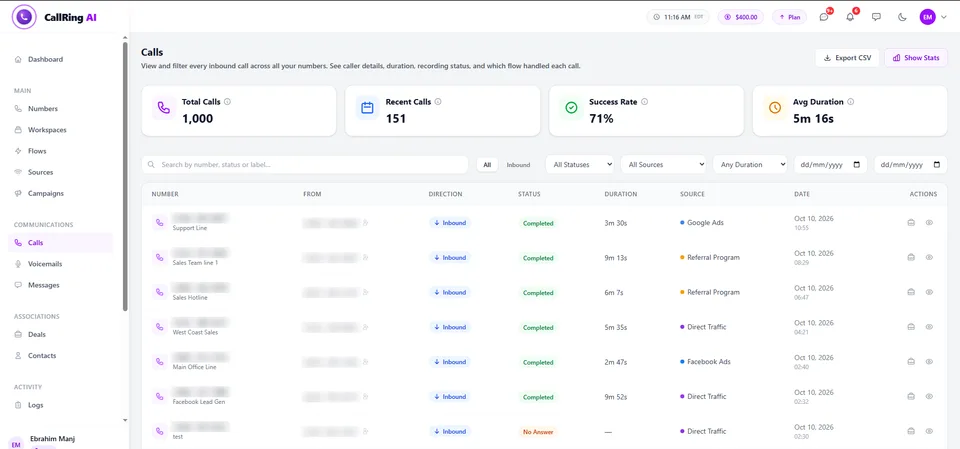
Because you can create as many custom sources and campaigns as you need, you can give a single ad group, keyword theme, or landing page its own number and read its calls separately. Calls are then linked to a contact and, through deals, to a value with an open, won, or lost status, so the question shifts from “how many calls?” to “which source produced revenue?”.
AI call analytics
AI call analytics: know what happened on every call
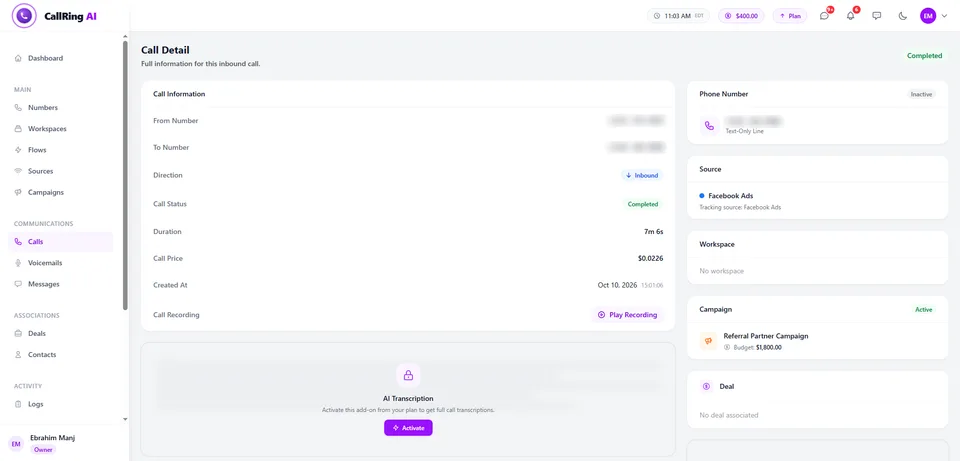
Knowing that a call came from Google Ads is half the answer. The other half is what was said and whether the caller was worth a callback. CallRing AI applies AI to each recorded call, so nobody has to replay audio to find out.
Call recording
Record calls with an automatic spoken disclaimer, so you can review conversations later.
AI transcription
Every recorded call becomes searchable text, with speaker labels and sentiment.
AI call summaries
A short plain-English recap of who called, what they wanted, and what was agreed, ready when the call ends.
CallScore lead scoring
Calls are ranked by quality and intent so your team calls back the strongest leads first.
Voicemail transcription
When nobody answers, the message is captured and transcribed so you can read it instead of listening.
Spam call blocking
Flag spam callers and block bad numbers so they do not distort your call data.
Read more about AI call transcription and summaries and CallScore AI call scoring. AI transcripts and summaries are available on every plan, including Free; transcription is billed per minute at the rate on the pricing page.
Integrations
Integrations: Google Analytics, Tag Manager, CRM and more
Call data is only useful where your team already works. CallRing AI sends calls to these tools today:
Google Analytics 4
Send call events to GA4 so phone calls sit next to web conversions. Mark them as key events.
Google Tag Manager
Fire GA4, Google Ads conversion, or custom tags from calls via your server-side container.
HubSpot
Log every call to your HubSpot CRM automatically.
Slack
Post calls, missed calls, and voicemails to a channel.
Zapier
Connect call events to the rest of your apps.
Google Sheets
Log every call to a spreadsheet.
Custom webhooks
Send raw call events to any endpoint you control.
A Salesforce integration is coming soon. CallRing AI does not currently list a native one-click Google Ads integration: Google Ads conversions are fired through Google Tag Manager or GA4 key events, as explained in our guide to tracking phone calls from Google Ads.
Who it’s for
Who inbound call tracking is for
Any business where customers call before they buy gets value from knowing why they called. These are the industries we see the clearest fit for:
Call tracking for home services
See which ads and directories book jobs, and which calls came out of hours.
Call tracking for medical and dental
Track new-patient calls back to the campaign that earned them.
Call tracking for law firms
Find out which marketing sends the enquiries worth taking.
Call tracking for real estate
Tie buyer and seller calls to listings and lead sources.
Call tracking for auto dealers
Compare which sources produce showroom and service calls.
Call tracking for marketing agencies
Prove the calls each client campaign produced, in a workspace per client.
See every vertical on the industries page, or read the use cases for agencies, multi-location businesses, and teams running paid ads.
Pricing
Pricing overview
CallRing AI has four plans, and the Free plan is a real plan with no expiry date. Paid plans are $10 per month less when billed yearly. Phone numbers, call minutes, and AI transcription are billed on usage; see the full pricing page for rates.
Free
$0/mo
- Call tracking and call history
- AI call transcripts and summaries
- Spam protection
- 1 workspace, 2 team members
Starter
$29/mo
- Everything in Free
- 2 free numbers, 3 free sources
- Dynamic Number Insertion (DNI)
- Google Analytics and Google Sheets
Growth
$59/mo
- Everything in Starter
- 4 free numbers, 5 free sources
- Advanced call intelligence
- All available integrations
Scale
$99/mo
- Everything in Growth
- 8 free numbers, 10 free sources
- HubSpot and custom webhooks
- Advanced reporting
Comparing tools first? See our roundup of the best call tracking software or read what you actually get from free call tracking software.
FAQ
Inbound call tracking FAQ
What is the best software to track phone calls?
The best software to track phone calls is the one that ties each call to the marketing that produced it and fits your budget, team, and tools. Look for dynamic number insertion, source and campaign attribution, call recording, and integrations with your analytics and CRM. CallRing AI covers all of these and adds AI transcripts, summaries, and CallScore lead scoring, and you can see how it stacks up against other tools in our comparison of the best call tracking software.
What call tracking software is best?
There is no single best call tracking software for everyone. Small businesses and agencies often want simple setup and fair pricing, enterprises want deep conversation intelligence, and pay-per-call operators want advanced routing and bidding. CallRing AI is built for businesses and agencies that want call tracking, call flows, and AI call insights in one tool, with a Free plan to start.
How does inbound call tracking work?
Inbound call tracking gives each marketing source its own tracking phone number and logs every call that comes in on it. When someone dials, the call is forwarded to your team as normal while the platform records the source, campaign, duration, and outcome. In CallRing AI the recording, transcript, and AI summary are saved against that call automatically.
What is dynamic number insertion?
Dynamic number insertion (DNI) automatically swaps the phone number shown on your website for a tracking number based on how each visitor arrived, such as Google Ads, organic search, or social media. When that visitor calls, the call is attributed to the source behind it. In CallRing AI, DNI works with number pools and is available on paid plans.
Is call recording and call tracking legal?
Call tracking itself, which means assigning numbers and logging call data, is widely used and legal. Call recording is regulated and varies by country and state, and some places require every party on the call to consent. CallRing AI lets you add a spoken recording notice to your greeting, but you are responsible for following the laws that apply to you, and this is general information, not legal advice.
Can call tracking integrate with Google Ads and GA4?
Yes for GA4: CallRing AI sends calls to Google Analytics 4 as events, which you can mark as key events and use in reports. For Google Ads, you can fire Google Ads conversion tags from Google Tag Manager when a call completes, or use GA4 key events in your Google Ads setup. CallRing AI does not list a native one-click Google Ads integration at this time.
See which marketing makes your phone ring
Track every inbound call to its source and campaign, and let AI read the calls for you.
Looking for the full platform overview? Visit our call tracking software page.